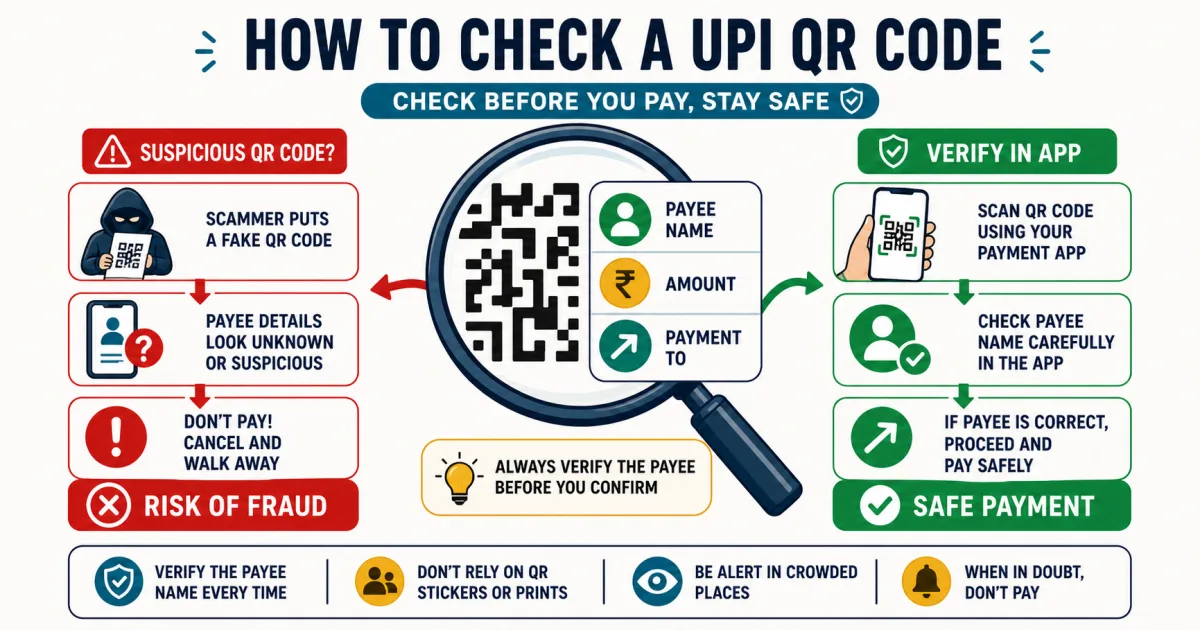
The trick behind almost every fake UPI QR code
A fake UPI QR code almost never asks you to pay in plain terms — it asks you to scan "to receive" a refund, cashback, prize, or payment, then walks you into entering your UPI PIN. The catch: entering your UPI PIN is not required to receive money. NPCI warns that scanning a QR and entering a UPI PIN is a payment action, not a way to collect a refund, prize, or incoming transfer.
What a UPI QR code actually encodes
A common intent-based UPI payment QR decodes to a link in the form
upi://pay?pa=...&pn=...&am=...&tn=.... Here's what each part means:
| Parameter | What it is |
|---|---|
pa | Payee address — the UPI ID the money actually goes to. |
pn | Payee name carried in the intent. Do not trust it alone; compare the beneficiary resolved by your payment app. |
am | Amount — if present, your app pre-fills it and asks you to confirm and PIN-authorize a payment. |
tn | Transaction note — also free text; this is where "Receive Cashback ₹500" gets written. |
The pay instruction opens a payment flow; it does not authorize one until you review and
confirm it. Treat pn and tn as untrusted labels and rely on the beneficiary details
your payment app resolves plus an independently verified UPI ID.
Why the "receive" wording works even though it's technically false
QR codes feel as though they could move money in either direction because people routinely display their own receive QR while customers scan it to pay them. Scammers rely on that ambiguity, plus urgency ("claim before it expires") and a plausible amount, to get a PIN entered without the person reading the confirmation screen closely. The screen should show the payee and amount. Stop if those details do not exactly match the payment you intended.
How to check a QR code before you scan — 3 steps
Upload the QR image, scan it live, or paste the UPI text into
the UPI & QR Safety Checker
— nothing leaves your device.
Read the verdict, not just the payee name. The checker specifically flags the pay-vs-receive mismatch, brand impersonation (a payee name claiming to be a bank or company on an unrecognised handle), and known scam-bait wording — the same signals worth checking by eye if you don't have the tool open.
If it says pay, and you didn't mean to buy anything — stop. Never enter your UPI PIN on a screen you don't fully understand, regardless of what the QR or the sender told you it was for.
If you already paid
Contact your bank and UPI app immediately. Preserve the transaction ID, QR image, chat, phone number, and screenshots. Report financial cyber fraud through India's helpline 1930 or cybercrime.gov.in. Do not pay anyone who promises guaranteed recovery for another fee.
Related UPI tools and guides
Sources and methodology
- NPCI fraud awareness — UPI PIN and QR-payment safety guidance.
- NPCI UPI FAQs — how UPI payments and complaints work.
- Indian Cybercrime Coordination Centre reporting portal — official reporting channel.
Frequently Asked Questions
Is scanning a QR code itself dangerous?
Scanning a standard payment QR normally decodes instructions and opens a review screen; it does not by itself authorize a UPI payment. Risk increases if you follow a malicious link, install software, share credentials, or approve a debit with your UPI PIN. Read the app screen before acting.
How can a QR code that says "receive money" actually be a request to pay?
A UPI QR encodes a link like upi://pay?pa=scammer@bank&am=5000&tn=Receive+Cashback. The "pay" in that link is the real instruction — your UPI app opens a payment screen. The words "Receive Cashback" are just text in the transaction note field, which the scammer can set to say anything. Your app shows what the link actually does (pay), not what the note claims.
Does a real "receive money" QR code ever need an amount or a PIN?
No. To genuinely receive money, someone pays you — you share your UPI ID or a receive QR with no amount attached, and you never touch your PIN. Any QR that has a pre-filled amount AND asks you to enter your PIN is, by definition, a payment request, regardless of what the surrounding text says.
What if the QR code has a well-known brand name or logo on it?
A logo printed beside a QR proves nothing, and the name encoded in a link can be misleading. Your payment app may resolve additional beneficiary information, so compare the app-displayed payee and UPI ID with an official source you obtained independently before paying.
What should I do if I've already paid a scam QR code?
Contact your bank and UPI app immediately, preserve the transaction ID and screenshots, and report financial cyber fraud through helpline 1930 or cybercrime.gov.in. Fast reporting may help, but recovery is not guaranteed.